
Häufig gestellte Fragen
How can I create a quote for VPN Tracker?
VPN Tracker offers a convenient self-service quote tool. Here’s how to get started:
- Go to the VPN Tracker Store
- Add the requested licenses to your shopping cart by clicking the Plus Symbol.
- Be sure to select: “Purchase as new plan”. The quote tool does not currently support the “Add to an existing plan” feature.
- Once you have added the licenses to your cart click on the blue “Save as quote” button on the right side of the page
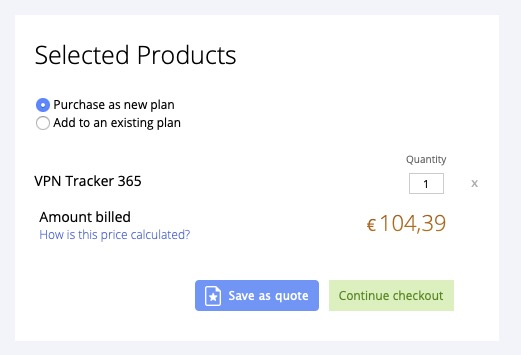
- Your product selection and price will be saved into a quote which will remain valid for seven days after it has been generated.
- Be sure to log in to your account to see your final price.
- You can share your quote with others by sending them the URL of your quote.
- Alternatively, you can export the quote as a PDF or print it.
- Once you are ready to purchase, just click the “Purchase Now” button and all items from your quote will be directly put back into your shopping cart and you can proceed with your purchase.